


Friday, 31 December 2010


Coder dridri has released OpenIdea Iso Loader, an alternative solution to Liquidzigong’s Prometheus ISO Loader with a slightly different twist: It runs your ISOs directly from the PSP XMB.
How Do I Install?
- Extract the ISO Loader and put all the .prx-files in “ms0:PSPSYSTEM”. there is NO need to register these in the vsh.txt file
- Take an ISO of your choice and drop it onto the “iso_packer.exe” that is the eboot converter (download Open Idea Eboot Builder).
- After the program finished converting, put the EBOOT (that can be found in the same directory as the ISO it has been created from) on your MS like this “ms0:/PSP/GAME/anynamehere/EBOOT.PBP”
- The converted ISO should now show up in the games section in the XMB.
Source: qj

Downgrading your psp is not really recommended, since every time you update or upgrade your psp, there is a chance of bricking your psp. especially 3001 and Go models. I do not recommend doing it, but here is the "How to" anyways:
- Start 6.20 TN-B
- Download the following files:
- Place PSARDumper in the PSP/GAME folder like you would any other homebrew and copy the OFW EBOOT.PBP to the root of your memory stick
- Start PSARDumper and press circle
- After the program finishes, connect the USB cable to your PSP and navigate to the folder F0, which should now be at the root of your memory stick
- Copy /F0/vsh/etc/version.txt to /seplugins/version.txt
- Go back to your PSP XMB and press select to bring up the VSH menu. Go to “Fake Index.dat” and change it to “enabled”. Next, select “restart vsh”
- Copy the OFW EBOOT.PBP to “PSP/GAME/UPDATE/EBOOT.PBP”
- On your PSP start the OFW installation as you would any other firmware update
- After it finishes, the PSP will restart and a blue screen will appear saying that the PSP settings are invalid. Press circle and the PSP will restore default settings and restart. You now have OFW installed.
Source: psp-hacks
Thursday, 30 December 2010

Update: 6.20 TN-B has been released. Total_Noob has updated his 6.20 TN CFW, here is the Changelog:
- Fixed homebrew execution crash on some PSPs (thanks to HacKmaN for debugging)
- Added PSP-3000 4g model support
- Resolved some important NIDs
- Added FAKE INDEX.DAT to TN VSH Menu.
- Dump whatever firmware with psardumper.
- Copy flash0:/vsh/etc/version.txt to ms0:/seplugins/version.txt.
- Enable the option and restart VSH, now your PSP version is faked.
- -> To downgrade just use a lower firmware EBOOT.
DOWNLOAD
Source: psp-hacks
Wednesday, 29 December 2010

PSP coder Takka has released a new version of his handy homebrewing app, ISO Tool, a nifty brew that allows users to decrypt, convert and patch all the latest ISOs, making it compatible with their own CFW PSP.
Changelog (translated):
- ISO Tool v1.956:
- [NEW] TAG: 0xD91617F0 decoding support
- [NEW] ms / seplugin / prm / key.txt to add the settings 0xD91617F0
- Changes to these files, iso_tool Prometheus3-v4 If you have changed in the decoding can be started without
- ISO Tool v1.955:
- [BUG] Prometheus could not fix the patch is successfully
- [NEW] EBOOT conversions up to 20 times faster than
- [NEW] changed as a cipher decryption carried out by using the
- I think the existing TAG is covered if the decoding could be displayed, please tell TAG. However, the software has been used is not compatible with earlier 0x80000000/0xC0CB167C. The latest of course does not correspond to the TAG
Source: qj

Tuesday, 28 December 2010

Takka releases CWCHEAT for 6.20 TN-A. Now you can cheat each and every ISO you’ve loaded on that memory stick of yours. You can ctivate CWCHEAT for 6.20 TN-A in game.txt, which should be located in your seplugins directory. If you’re unsure, read the instructions for Game Categories Light. The same idea but you’re using game.txt instead of vsh.txt. Once you’ve done that, start your game and hold select until the CWCHEAT menu appears.
Update: With the cheat database added, under the seplugins directory, where game.txt, vsh.txt, and the prx files reside, create a new directory called “cwcheat.” Copy cheat.db there so you end up with this: seplugins/cwcheat/cheat.db. Now try.
Monday, 27 December 2010

Patpat recently released a compatible version of CXMB for 6.20 TN-A and also
included a 6.20 theme — a real nice one too.
To install CXMB for 6.20 TN-A you also need to unpack and decrypt some firmware 6.20 files. Use this version of psardumper with this 6.20 EBOOT. Find these files: paf.prx, common_gui.prx, vshmain.prx and copy them to ms0:/cxmb/support/ (or ef0 on your PSP Go). Copy cxmb.prx to ms0:/cxmb/, so you’re left with ms0:/cxmb/cxmb.prx. Open vsh.txt in the seplugins directory and add this line: ms0:/cxmb/cxmb.prx 1 (or again ef0).
Enjoy!
Download:
Source: psp-hacks
Saturday, 25 December 2010

Friday, 24 December 2010
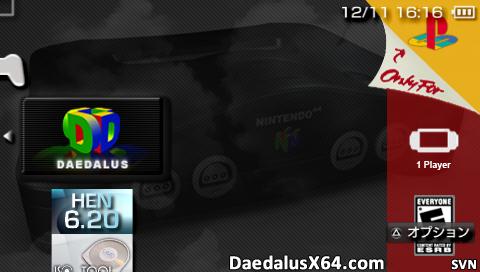
Courtesy of Wally and salvy of the DaedalusX64 Team, here come DaedalusX64 support for TA motherboard users.
Note from Wally:
Salvy and I have been working on getting Daedalus working on the newly release Total Noob Homebrew Enabler (HEN)
It turns out that the higher 32MB of ram avaliable (of the 64 mb total) does not work on the PSP 3000 / GO or PSP's with higher firmware respectively.
I hope you all have a Merry Christmas and a Happy New Year!!
Salvy and I have been working on getting Daedalus working on the newly release Total Noob Homebrew Enabler (HEN)
It turns out that the higher 32MB of ram avaliable (of the 64 mb total) does not work on the PSP 3000 / GO or PSP's with higher firmware respectively.
I hope you all have a Merry Christmas and a Happy New Year!!

If you din't know how to enable plugins with 6.20 TN-A, here’s how:
Game Categories Light v1.0 Features
- Adds a new option called ‘By Category’ to your ‘Group Content’ menu.
- Adds the ‘By Category’ option in the Square-button cycling.
- Defaults to the ‘By Category’ option when you load the menu.
- Introduces a subtitle that shows the game type and firmware limits.
Game Categories Light v1.0 Installation
- Create X:/seplugins if it doesn’t exist.
- Create X:/seplugins/vsh.txt if it doesn’t exist and edit it by adding one of these on a new line:
- PSPgo (built-in storage): ef0:/seplugins/game_categories_light.prx 1
- All other PSP models: ms0:/seplugins/game_categories_light.prx 1
- Reboot your PSP using ‘RESTART VSH’ in the VSH menu so HEN is maintained.
Thursday, 23 December 2010

Wednesday, 22 December 2010
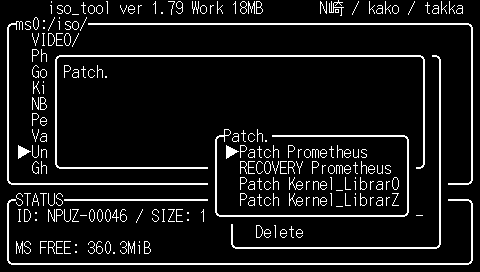
PSP coder Takka has recently updated his ISO Tool, a handy homebrew that allows you to decrypt, convert and patch all latest ISOs, making it compatible with your CFW PSP.
Changelog (translated):
- ISO Tool v1.954:
- [BUG] EBOOT Fixed a freeze on conversion may be
- ISO Tool v1.953:
- [BUG] Fixed been changed from the current directory when you restart
- [NEW] ISO / CSO EBOOT add functionality to convert from (testing)
- [NEW] With the above, ./DATA/iso2eboot Add
- ISO Tool v1.952:
- [BUG] (auto_cfw) 5.00M33 plug-in system for peagasus.prx auto_cfw Fixed to work well
- [BUG] CFW adjust various display name
- [NEW] startup ms0: / ISO folder to create change
- [NEW] (script) if the exists / not_exists Add
- [NEW] (script) set_plugin Add
- [BUG] (script) flash of the rm had failed to fix
- [NEW] (script) Akira Osamu log files clearly
- [BUG] (auto_cfw) auto_cfw when you release the changes back to its original libmp3.prx
- [BUG] (auto_cfw) "ms0: / seplugins/636/libmp3.prx" If there is no flash so you do not copy the correct
- [NEW] CFW change the script to do all the switching
DOWNLOAD
Source: qj
Saturday, 18 December 2010

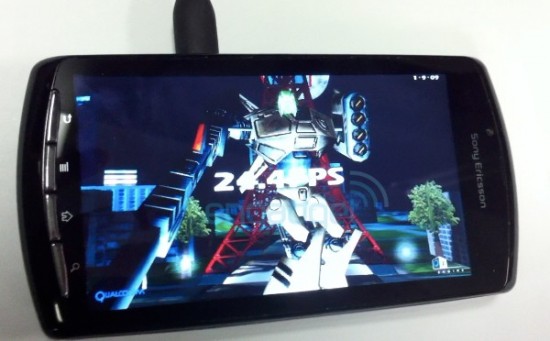
A video appearing on YouTube late yesterday all but confirms the existence of Sony's "PlayStation Phone."
We got our glimpse of the device back in October when leaked photos on tech blog Engadget. Now, a new video demonstration shows the phone running while highlighting many of its features.
The phone is being called the Sony Ericsson ZEUS - Z1 and, like the PSPgo, includes a sliding mechanism that reveals the hidden controller input. While it's unclear what types of games the device will play, another YouTube video uploaded soon after by the same user shows the PlayStation application load successfully, but a notice says there are no games currently installed.
A rumored report from August suggests the phone will be powered by Google's Android operating system. It's believed it will be revealed at the Mobile World Congress in Barcelona this coming February.
Source: IGN
Friday, 17 December 2010

Changelog:
- Revision 611
- [!] Implement osAiGetLength correctly (I got confused with ReadLength documentation..)
- [~] Disable loop opt for TWINE,Hercules,Blues Brothers (Fixes movement problems)
- [+] Add correct savetype for Oozumou, Oozumou 2, Tamagotchi World 64 (They boot now)
- Revision 610
- [!] Make most HLEAudio routines static
- [-] Removed unused code which is found by static analyzer
- Revision 609
- [-] Remove LoadPIF when booting ROM. We just simulate the boot process.
- Revision 608
- [!] Fixed bug from 588 that caused several games to stop working
- [~] Simplified clean scene
- Revision 607
- [+] Added zoom function to get rid of black bars (see Edit Preferences when loading a ROM around 107% usually works)
- [!] Reorganized call in Dynarec for release mode
- [!] Uses smaller buffers for audio (lags less but might be more choppy)
- [!] Some optimazions in PSPrenderer (Salvy/Corn)
Source: qj
Tuesday, 14 December 2010

Mobile Assault version 1.5 brings new improvements, bug fixes and other changes to the excellent homebrewed 3D helicopter shooter.
Changelog:
- Features
- Accelerometer support (iPhone)
- Improvements
- Airstrikes now create more damage over a wider area
- New grass terrain texture
- Bug Fixes
- Fix for crash on startup for iOS 3.x devices.
- Under the hood
- Implemented better collisison detection
Developer's note:
If you are upgrading from a previous version, be sure to back up your mobileassault.db before copying the new folder over.
Sunday, 12 December 2010

The latest revision of the Nintendo 64 emulator project for the PlayStation Portable is out, bringing us a new set of changes, more tweaks and improvements.
Changelog:
- Revision 607:
- [+] Added zoom function to get rid of black bars (see Edit Preferences when loading a ROM around 107% usually works)
- [!] Reorganized call in Dynarec for release mode
- [!] Uses smaller buffers for audio (lags less but might be more choppy)
- [!] Some optimazions in PSPrenderer
Source: qj
Friday, 10 December 2010
Tuesday, 7 December 2010

Developer frillybobhas released a tweaked out version of gpSP for all you that are using Half Byte Loader. If you din't know, gpSP emulates the Game Boy Advance. Primarily tweaks improve your overall GBA+HBL experience. Tweaks like:
- Speed boost for 6.20/6.30/6.31 users
- PRX in place for when TN-HEN gets released (not done of course)
- Less crashes with saving games (specifically Mario Party Advance, that’s what made me code this better for HBL)
- Added special HBL font (not in use, going to be later)
Source: psp-hacks

Friday, 3 December 2010

The DaedalusX64 Team has released a new version of their ever-popular Nintendo 64 emulator for the PlayStation Portable, with the following changes;
- Revision 602
- [!] Fix compiling issue from 601
- [!] Fixed bug in 1/2 cycle for BlendModes
- [~] optimized LookupBlendState
- Revision 601
- Revision 600
- [+] Small speed up in DList processing (Corn)
- [~] Fixed daedalus profiler to profile Ucodes properly (Corn)
- [~] Fixed missing preview msg in classic GUI (Corn)
- [+] ScreenShots will be saved in ms0:/PICTURE for release and default dir for debug build
- [~] Fixed issue that caused gui selection not be saved in preferences.ini
- [~] Small clean ups, made a couple of funcs debug only, etc
- [!] Corrected regression that messed up the penguins in M64
- [~} Corrected regression that caused analog stick to stop working (thx KingPepper for reporting)
- [!] Optimized intraFontGetID, uses about 70% less cpu (gui feels smoother now)
- [~} Corrected overlapping text when psp is charging in bat info
- [+] Changed how button polling in GUI is done, now is only done in one place instead of zillion times everywhere ( note : gui buttons now will be only checked 16.5 times/sec too) (Corn/Salvy)
- Revision 599
- [!] Made kernelbuttons even more robust
- [!] Removed a bunch of hacks I had for KernelButtons (no longer need 'em)
- [+] Implemented a wrapper for kernelbuttons to clean up code and make things easier
- [~] Minor tweaks on the battery info when PSP is charging (psppwner300)
- Revision 598 - Directory Listing
- [+] Made rom deletion more robust, now rom list is refreshed. warning shows up before deleting, and deletion is canceled if other input is detected (Classic Gui recommended) (Corn)
- [+] Is now possible now to reset only settings or only hle caches (Corn)
- [!] Killed a couple of warnings from last commit (Corn)
- [!] Improved Reset settings instructions, just follow the onscreen indirections.
- [+] Added a new function to print intrafont text (pretty easy to use and can be used everywhere)
- [!] Battery status and time is printed with intrafont to match with the Gui
- [~] Improved GUI switching
- [~] Corrected typo that prevented gprof build from compiling
- [~] Removed debug info that I forgot from DeleteRecursive (debug build compiles again)
- Revision 597 - Directory Listing
- [+] Added build support for psp gprof (Thanks Hardhat for the help!)
- [!] Cleaned up global prefs, also made "skip splash screen" and other prefs debug only
- [!] Improved "Reset Settings", now is more robust and friendly (moved to global too)
- [+] Implemented recursive deletion, hle cache is now deleted when resetting settings
- [+] Implemented tooltips with usage info of features of the emu (only for Classic GUI) (Corn)
- [~] Moved PSP Slim cache init out of initialization list
- Warning : Make sure to back up your memory stick before using this revision.
Source: qj
Subscribe to:
Posts (Atom)


