zx-psp

  • Subscribe to our RSS feed.
  • Twitter
  • StumbleUpon
  • Reddit
  • Facebook
  • Digg

Friday, 20 August 2010

Ultimate VSH Menu Final

Posted on 16:34 by Unknown


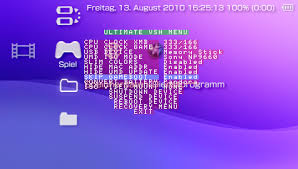
Ultimate VSH Menu is an advanced VSH Menu for CFW 5.XX. There are many useful features, like hide umd update icon, skip gameboot or load recovery menu.

Features
- All features of the official VSH Menu.
- Slim Colors Patch by Bubbletune integrated (don`t forget to flash 13-27.bmp).
- Ability to hide the MAC address in the System Information.
- Possibility to hide the UMD update icon.
- Skip gameboot can be enabled or disabled (you'll save ~4sec^^).
- Convert battery option is available in the VSH Menu (convert battery to Pandora, Autoboot or Normal).
- Option to suspend the device.
- VSH Recovery can be opened in the VSH Menu.
- Ability to quickly exit the recovery by pressing SELECT or HOME (or use the normal Exit).
- Recovery can reboot by holding R and going to exit (useful for VSH plugins and other configurations).
- VSH Recovery can be loaded from the Memory Stick (ms0:/seplugins/vshrecovery.prx).
- Compatibility with Lockdown by Torch.

Instruction
Copy the 'PSP' folder to the root of your Memory Stick and launch 'Ultimate VSH Menu Installer'.

Donation ( THIS IS NOT MY PAYPAL> IT IS TOTAL NOOBS>>>THE CREATOR OF ULTIMATE VSH MENU.
If you like this plugin, you can donate me, thanks:)
https://www.paypal.com/cgi-bin/webscr?cmd=_s-xclick&hosted_button_id=8158859

Download
Read More
Posted in Plugins | No comments

Sunday, 15 August 2010

Custom Firmware 5.00 TZS-6

Posted on 05:57 by Unknown


This is similar to 5.00 M33-6 with extras flashed in.  Extras like PSNLover, Torky’s M33 6.20 plugin,  and the M33-7 recovery console.

I would Personally recommend you stick with 5.00 M33-6 (or 5.50 GEN-D3) and manually install the plugins you need. Messing with flash can be dangerous, but you knew that. Should you want to proceed anyway, here’s how:
  1. Ensure you’re running 5.00 M33-6 first. If not, skip this entirely.
  2. Copy “5.00 TZS-6 Easy Installer” to PSP/GAME on your memory stick.
  3. Create a “kd620″ directory in the root of your memory stick.
  4. In the seplugins directory, remove psnlover.prx & m33_620.prx, and their entries in vsh.txt and game.txt.
  5. Launch the easy installer and follow the on-screen instructions.
  6. After a successful install, enter the recovery console and set:

    • Configuration -> Fake region -> Korea
    • Configuration -> Use version.txt -> Enabled
  7. Boot back to the XMB and try it out.
Download
    Read More
    Posted in Firmware | No comments

    Monday, 9 August 2010

    TempAR v1.2 (Updated)

    Posted on 15:35 by Unknown

    The Action Replay / CWCHEAT NitePR Mod —is  used for cheating each and every PSP (POPS too!) game.
    Notable features of the latest update of the homebrew includes some new features, more fixes and various other improvements.

    Instructions for our new readers:
    1. Copy the whole TempAR directory to seplugins and add this line — ms0:/seplugins/TempAR/tempar.prx 1 — to game.txt.
    2. Start your game and press the “Home” button twice followed by VOL UP + VOL DOWN.
    3. Enable whatever cheats and press “Note” to activate ‘em.
    TempAR v1.2:
    • [+] Upper bits of fake addresses can now be retrieved. eg. Use 0x0A000002 to read the kernel mode buttons using the 16-bit PSPAR code types.
    • [+] Added an option to hijack the PSPAR button codes. This option if enabled will change PSPAR codes with code types 0×09 and 0x0A and an address of 0x09F00000 or higher to be treated as a button joker code. This makes codes such as the GTA: VCS moonjump code work without altering the code.
    • [+] Menu key, trigger key and screenshot key can now be configured under PRX.
    • [+] The POPS version now uses a different config file to the PSP version.
    • [+] Added PC CWCheatPOPS to PSPAR code converter.
    • [!] Fixed problem copying address from codelist to the Browser/Decoder.
    • [!] Button press prompt is no longer displayed on load. This should fix display problems with PSP Filer and probably some other homebrew/games.
    • [!] Fixed the 0×08 CWCheat code type.
    • [!] Codes which attempt to write a 16-bit value to 8-bit address or a 32-bit value to 8/16-bit address will no longer crash the PSP.
    • [!] MAC address patch is off by default to fix networking problems while plugin is enabled. User must remove config.bin for this change to take effect.
    Photobucket
    Read More
    Posted in Homebrew | No comments

    SensMe Channels for Custom Firmware 5.XX

    Posted on 15:26 by Unknown


    As introduced in PSP Firmware 6.10,  Sony’s music player with “proprietary music mood and tempo detection" is now functioning on custom firmware 5.00 M33 and 5.03/5.50 GEN.


    SensMe channels is a new music application for PSP that uses Sony’s proprietary 12 Tone Analysis technology to evaluate music tracks that have been imported from Media Go application on your PC to your PSP. The application automatically categorizes the tracks into 12 channels such as “Relax” or “Newly Added”. Check out the walk-thru demo to see how it works.


    Changes:
    • [!] Fix the problem can not play WMA
    • [!] To join the official icon

    Photobucket
    Read More
    Posted in Plugins | No comments

    Saturday, 7 August 2010

    Ultimate VSH Menu v2.00

    Posted on 14:12 by Unknown
     

    Description:
    Ultimate VSH Menu Revised by Total_Noob is alternative plugin to replace M33 and GEN official VSH menu. It is compatabile with custom firmware versions; 5.00M33, 5.02GEN, 5.03GEN & 5.50GEN. .


    [Features]
    * All functions of the official VSH Menu.
    * Ability to customize the colors.
    * The SELECT button can either open the Recovery(in-VSH Recovery), the VshMenu or nothing.
    * Recovery can reboot by holding R and exit the Recovery (useful for VSH plugins and other configurations).
    * The SELECT button can be change via the combo R + L + [].
    * VSH Recovery can be open in the VSH Menu.
    * Random color option is available to change the system color randomly.
    * An option in the VSH Menu to quickly start a homebrew (ms0:/PSP/GAME/VSHMENU/EBOOT.PBP).
    * Convert battery option is available in the VSH Menu (convert battery to Normal, Pandora or Autoboot).
    * Slim Colors Patch by Bubbletune integrate (only for psp phat).
    * USB charge can be change in the VSH Menu (only for psp slim).
    * Ability to hide the MAC address in the System Information.
    * UMD update icon can be hide in the XMB.
    * Possibility to take screenshots (combos are NOTE, R + NOTE, L + NOTE, R + SCREEN, L + SCREEN or NOTE + SCREEN).
    * Ability to suspend the device in the VSH Menu.

    [Requirements]
    * All PSP with a 5.xx Custom Firmware on board (even PSP-2000v3 and PSP-3000) : 5.00M33, 5.02GEN, 5.03GEN or 5.50GEN

    [Installation]
    * Download UltimateVSHmenuREVISED.zip
    * Connect your PSP to computer via USB Wire.
    * Toggle your PSP in USB Mode.
    * Click with right button of your mouse on downloaded file.
    * Choose "extract files..."
    * Choose the letter that the system attribute to your PSP in desktop.
    * Click on OK and wait that all files are copied on your computer.
    Note : if you have old version of UVSHM, files need to be overwrited.
    * Leave USB Mode
    * Go to the SEPLUGINS directory from your MS
    * open (or create) the VSH.TXT file abnd add inside this line :
    ms0:/seplugins/vshmenu.prx 1
    * Disconnect from USB mode ans reboot PSP
    * Enjoy.

    [Credits]
    PSPGen : Psp: for all the support his team and his permission to let me upload this plugin on their site.
    Gadget: For DevSite & betatesting
    Vegetano1: Beta Tester
    SchmilK: Beta Tester
    Bubbletune: for his incredible Slim Colors Patch.


    Focus on Ultimate VSH Menu fonctions :

    * CPU Clock XMB :
    - Choose the processor's speed in XMB

    * CPU Clock GAME :
    - Choose the processor's speed in GAME

    * USB Device :
    - Choose between MS, Fo ,F1 F2 F3, and UMD in USB mode.

    * UMD ISO Mode
    - Choose between différents ISO launching ways (Normal, OE ISOFs, M33 Driver, Sony NP9660)

    * USB Charge
    - Accept, or not, to charge battery from USB

    * Hide MAC Adress
    - Hide, or not, the PSP MAC Adress

    * Hide UMD Update
    - Hide Update Icon from UND

    * Screenshot
    - Allow, or not, to screenshot and choose the key/combo to do it.
    (R, R + Note, L + Note, R + Screen, L + Screen, Note + Screen, Disable)

    * SELECT Button
    - Allow to choose action affected to SELECT Button (Recovery, VSH Menu, or nothing) - Shortcut : L + r + SQUARE

    * Random Color :
    - Enabled ot disabled Random Color

    * Convert Battery
    - If the PSP can make it, this option can convert your battery in a pandora one or restore it to a normal one.

    * ISO Video Mount
    - Mount/unmount an ISO from UMD Video

    * Shutodwn Devive
    - Shutdown PSP

    * Suspend Device
    - Suspend PSP

    * Reboot device

    - Reboot PSP

    * Recovery Menu
    - Open the Recovery Menu directly from VSH

    Load EBOOT
    - Load ms0:/PSP/GAME/VSHMENU/EBOOT.PBP


    [Notes]
    o For use the in-VSH recovery on ChickHEN & CFWEnabler, copy the vshrecovery.prx file to the seplugins folder on your memory stick.
    o By special wishes or bugs, write me an e-mail: total_noob@hotmail.com.
    Source: pspslimhacks.com
    Photobucket
    Read More
    Posted in Plugins | No comments

    Tuesday, 3 August 2010

    Ultimate VSH Menu + v1.2 Released!

    Posted on 13:44 by Unknown

    A way to manage your PSP plugins straight from the XMB (or VSH).
     Here is the Full changelog:
     
    • - Ultimate VSH Menu is now BUGFREE
    • - Added "ISO VIDEO MOUNT"
    • - Compatible with the plugin Game Categories
    • - Compatible with cxmb
    • - Compatible on psp slim
    • - Load recovery menu work now on all psp
    • - It don't move automatically more
    • - Don't hide Ultimate VSH Menu on PSP store
    • - If you use a ctf theme, the mac addresse don't show on Chinese
    • - Don't show the battery serial, if you've got a psp slim TA-88 or TA-85 v2
    • - It hook the vshctrl to hide M33 VSH Menu, so Ultimate VSH Menu work, if you have "Use VshMenu" on "enabled"
    • - Added on installer a uninstall function

    Photobucket
    Read More
    Posted in Plugins | No comments

    Monday, 2 August 2010

    DayViewer v7

    Posted on 07:48 by Unknown

    This plugin is the best one i ever had, it allows you to edit the clock string and add more features like weekday, monthname, year, battery percent, battery lifetimer, battery percent and more.


    Changelog v7
    - Now you have the full possibility to edit the clock string to your desire.
    - Added battery lifetime.
    - Fixed incompatibility with AutoStart PRX.
    - Solved bug in unicode encoding: some character didn't show correctly.


    Instructions
    - Copy the 'seplugins' folder to your Memory Stick and add this line to 'vsh.txt': 'ms0:/seplugins/dayviewer.prx 1' (without the ').
    - Now, take a look in 'dayviewer_config.txt'.
    - Reboot your psp and enjoy:).


    Translation & Editing clock string

    The config file for the translation and the clock string is: 'dayviewer_config.txt'

    For the clock string, you can use these things:

    %weekday
    %day
    %monthname
    %month
    %year
    %hour12 (time format 12)
    %hour
    %min
    %sec
    %ampm
    %batpercent
    %batlifehour (battery life hour)
    %batlifemin (battery life minutes)

    Example: [SuperHero, %month-%day-%year %hour:%min:%sec %batpercent%%]


    Example 2: \%weekday, %day. %monthname %year %hour12:%min:%sec %ampm\CFW 5.50GEN-D3


    If you want to show the percent symbol you have to write '%%'.
    To make a new line, write '\'.
    If you make a new line, the clock string will slide up. To fix that, write '\' at the beginning of the string.

    *Only 100 Characters for the clock string.


    *Note(This is not my post, i only copy and paste most of it for your convenience)


    Source: http://www.consolespot.net/psp/index.php?page=2
    Photobucket
    Read More
    Posted in Plugins | No comments

    Mobile Assault 1.2 (3D helicopter)

    Posted on 07:41 by Unknown

    Glenn and I (the codetactics team) have just released v 1.2 of Mobile Assault (formally known as Apollonia). The changelist is as follows:

    Features
    * Better in game message system.
    * Achievements, with uploading to the leaderboard.

    Improvements
    * Add more text radio chatter to every mission.

    Bug Fixes
    * Fix a crash on startup on iPhone.

    Under The Hood
    * Game action performance improvements.
    * Preparation for mission scripting.
    * Fix small memory leaks.


    Photobucket
    Read More
    Posted in Homebrew | No comments

    XMB Icon Manager

    Posted on 07:38 by Unknown

    Xmb Icon Manager, this prx plug-in lets you rename and modify the functions of the XMB icons. And all without touching the flash0. (Which as we know can be is risky – Bricks aren’t nice..)

    You can use the network update icon to now shut down your PSP. Rename icons to suit your needs, for example an icon to boot a homebrew or PSX game. Below is a list of what modes are available.

    What does it do ?

    * Can change the name of any icon
    * Can change the function of any icon
    * Launch a files directly from any icon

    Modes available are :

    * shutdown
    * suspend
    * reboot
    * game (launch homebrews)
    * updater (Launch update)
    * pops (launch PSXgames)
    * backup (Launch ISO/CSO)
    * restartvsh (reboot VSH – usefull for PSP running under HEN or 5.03GEN)

    Installation is like any other prx plug-in. Add the following line to your vsh.txt inside the plug-ins folder of your MS.

    ms0:/seplugins/xmbim.prx 1

    Usage is detailed over at the source.

    Source: PSPGen


    Photobucket
    Read More
    Posted in Plugins | No comments
    Newer Posts Older Posts Home
    Subscribe to: Posts (Atom)

    Popular Posts

    • Official PSP Firmware 6.60 Released.
      PSP Firmware 6.60 aka PSP OFW 6.60 has been release not too long ago to the Playstation Community . PSP Firmware 6.60 was develop and rele...
    • PSP 6.60 Custom Firmware Install on any PSP - PSP, PSP Slim, PSP 3000, PSP Go & E1000
      1. Updating your  PSP  to 6.60: To begin   Download the Official PSP 6.60 firmware   and update your  PSP . To update the  PSP  simply extra...
    • PSP Custom Firmware 6.35 PRO-A
      Liquidzigong has released a new custom firmware for PSP 6.35 — PSP Custom Firmware 6.35 PRO-A. This slightly different  from neur0n’s as...
    • LCFW 6.XX PRO B10 Released!
      Once again a B revision outruns PRO C which is in development since B4. Without further ado, Here is 6.XX PRO B10. It features the usual bug...
    • PSP CFW 6.35 PRO-B + 6.35 Fast Recovery PRO-B
      Coders, Coldbird and Virtuous Flame have released Custom Firmware 6.35 PRO-B. This new release even supports PSX games that are non PSN stor...
    • PSP (DOOM) Legacy Third Release
      I f you have the original files (wad) for Doom Legacy, you can use this homebrew to play DOOM, DOOM 2, Final DOOM, or Heretic on your PSP. F...
    • How to install Prometheus Iso Loader
      In this tutorial, I will show how to install promethesus ISO loader to play those legally back up ISO'S. 1. Download promethesus ISO Loa...
    • DaedalusX64 Beta 3
      The DaedalusX64 Team has released a new version of  their ever Nintendo 64 emulator project for the PSP. Now at Beta 3, Most games are suppo...
    • PSP CFW 6.XX PRO-C Public Beta 0.06
      PSP CFW 6.XX PRO-C Public Beta 0.06 is the latest PSP CFW Beta to be made available to the PlayStation Homebrew community for PSP owners . ...
    • PSP Vita Firmware 1.66 Released.
      Recently, PlayStation rolled out the new 1.65 firmware update for PS Vita, which added a couple of small changes to the older firmware. But...

    Categories

    • Anime
    • Emulators
    • Firmware
    • Homebrew
    • How To
    • News
    • Plugins
    • ps3
    • PSP Official Firmware
    • PSP Vita
    • Themes

    Blog Archive

    • ►  2014 (1)
      • ►  February (1)
    • ►  2013 (3)
      • ►  December (3)
    • ►  2012 (9)
      • ►  May (1)
      • ►  April (1)
      • ►  March (2)
      • ►  February (3)
      • ►  January (2)
    • ►  2011 (184)
      • ►  December (7)
      • ►  November (17)
      • ►  October (5)
      • ►  September (6)
      • ►  August (10)
      • ►  July (13)
      • ►  June (8)
      • ►  May (13)
      • ►  April (18)
      • ►  March (31)
      • ►  February (20)
      • ►  January (36)
    • ▼  2010 (91)
      • ►  December (21)
      • ►  November (21)
      • ►  October (8)
      • ►  September (2)
      • ▼  August (9)
        • Ultimate VSH Menu Final
        • Custom Firmware 5.00 TZS-6
        • TempAR v1.2 (Updated)
        • SensMe Channels for Custom Firmware 5.XX
        • Ultimate VSH Menu v2.00
        • Ultimate VSH Menu + v1.2 Released!
        • DayViewer v7
        • Mobile Assault 1.2 (3D helicopter)
        • XMB Icon Manager
      • ►  July (20)
      • ►  June (1)
      • ►  March (5)
      • ►  January (4)
    • ►  2009 (12)
      • ►  December (11)
      • ►  November (1)
    Powered by Blogger.

    About Me

    Unknown
    View my complete profile