zx-psp

  • Subscribe to our RSS feed.
  • Twitter
  • StumbleUpon
  • Reddit
  • Facebook
  • Digg

Saturday, 26 December 2009

Run Windows 3.1- 98 On PSP (How To)

Posted on 11:30 by Unknown

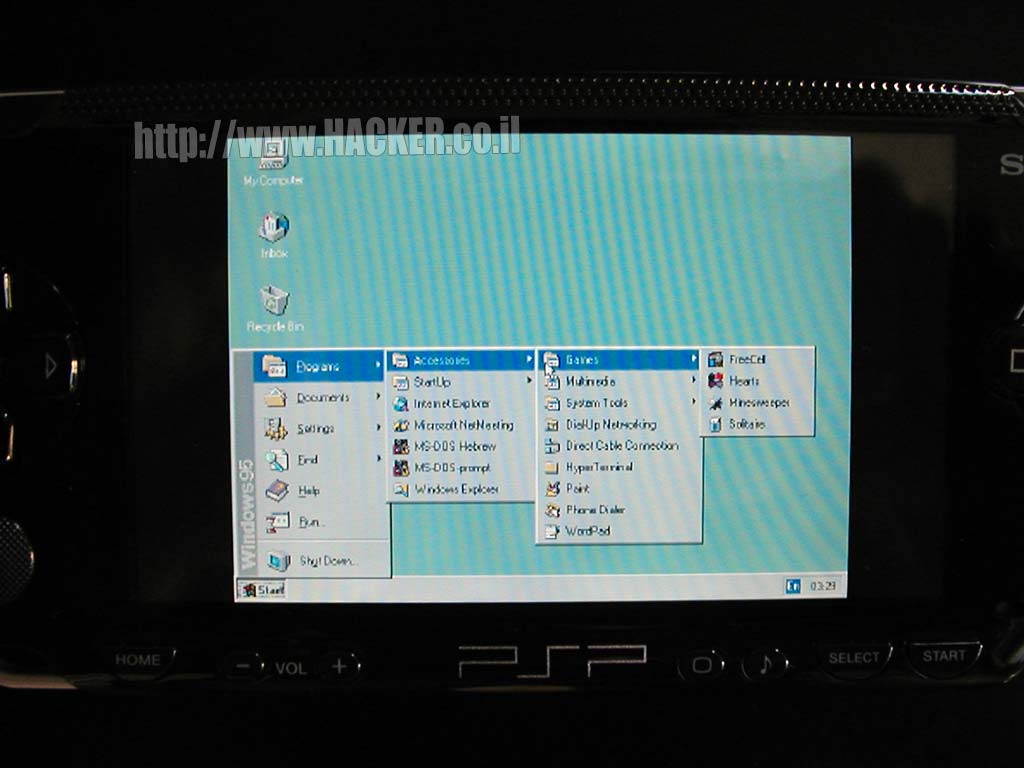
This is Windows 95 emulating on the PSP using DOSBox, runs 3x faster than PSP Bochs. It is compatible with PSP Slim, so all PSP with official firmware 1.5 that has been kxploit patched or custom firmware can do this.

Requirements:
*PSP Slim or Phat
*PSP with official firmware 1.50 with kxploit patched or any custom firmware
*Memory Stick Pro/Duo with at least 300 MB for the best performance.

Downloads:

(UPDATED) DOSBox Package (REQUIRED!!!):
MediaFire - Download

Installation:
1. Download file from link above.
2. Open archive with Zip/RAR utility, like WinRAR or WinZip. Note: The default Windows Zipper does not work with this file, only zip format.
3. Connect your PSP to your computer.
4. Go to the root of your Memory Stick.
5. Now go to the file you've downloaded above.
6. Drag the PSP folder to the root of your Memory Stick.
7. Wait for a while then it's done. But wait, it will not be fun unless you put the Windows img below.

Windows 3.1 IMG (Size: 7MB):
MediaFire -   Download


 Installation:
1. Download file from link above.
2. Open archive with Zip/RAR utility, like WinRAR or WinZip. Note: The default Windows Zipper does not work with this file, only zip format.
3. Connect your PSP to your computer.
4. Go to PSP folder on your PSP.
5. Then go to GAME folder.
6. Then go to DOSBox folder.
7a.For default Windows Zipper: Right click on w31.img in the zip you opened, click copy, then go back to the DOSBox

Source:  http://www.mypsp.com.au/VideoDetail.aspx?id=838
Read More
Posted in Emulators, How To | No comments

Monday, 21 December 2009

Xplora v1.8 (Homebrew)

Posted on 08:04 by Unknown


New xplora Updated:

Xplora v1.8 changes:
•Now at startup the CPU clock is set to 222Mhz (333 is no longer needed)
•Improved the “Zip manager” that have some bugs in the previous release
•Added automatic management in the message box
•Added new GUI elements to the main windows manager
•Added two progress bars while copying/moving folders
•Improved the “Umd Dumper” with a new interface and some improved functions
•Added “DAX” support to the “Umd Dumper”
•Added a new dynamic mouse (Hold [] and move the analog to scroll list)
•Improved some functions for copying
•Added some info in the main System Info window
•Fixed the bootstrap module that have some problems in the previous release
•Improved the global memory usage
•Improved the main file manager
•Added a history feature in the file manager
•Added a simple utility that can dump the entire NAND on the MS
•Improved the management of some threads and tasks
•Improved the visualization in the system tray
•Improved the “Homebrew Sorter” that now shows the icons and the real names of homebrews, ISO’s and CSO’s
•Improved the GUI of the “Music Player”
•Added “.ogg” support in the “Music Player”
•Improved the library used to get the Mp3 files infos with some new functions
•Improved the Mp3 Player that now use Media Engine to decode audio
•Now during the Music Player the main CPU clock is set to minimum values
•Now you can listen to music while using the “Text Editor”
•Added fadeout effetc to the Mp3 Player
•Now when the screen is disabled doesn’t go to standby
•Added screen fadeout in the Music Player
•Now if the headphone is removed while playing some music, music are automatically paused
•Now you can have a image for background in the main File Manager (”background.png” in “data” folder)
•Completely rewrote the Text Editor, that shows a lot of problems of memory management and rendering speed
•Fixed some bugs in the loading function of the OSK
•Note: The Text editor is not 100% completed now, so can have some bugs, sorry!
•Improved the PMF Player, that now doesn’t need to be rebooted
•Now while viewing some movies you can force stop it with “HOME” button
•Added a cfw check to enable run only on 4.01 and highter cfw (its recommended to update to the last cfw (5.00 M33-4) for a better compatibility)

Download: http://www.psp-hacks.com/2009/01/03/psp-file-manager-xplora-v18-released/
Source: http://www.psp-hacks.com/
Read More
Posted in Homebrew | No comments

Thursday, 17 December 2009

PSP Gen D3 And Hen C Released!

Posted on 13:22 by Unknown


Signed, sealed, and delivered fresh from Team GEN: PSP Custom Firmware 5.50 GEN-D3… And not only that — drop the 3 and flip the ‘D’ to a ‘C’ — you get 5.03 GEN-C (for HEN) putting 3000/TA-088v3 back on the map!


CFW 5.50 GEN-D3 / 5.03 GEN-C:


•Ability to run 6.10 + games without having to patch (UMD or ISO)

•Ability to run games protected as Gundan vs. Gundam Naruto for example (UMD or ISO)

•To launching PSN demos requiring 6.10 + without having to patch


Gen D3: Download
 
 
Hen   C: Download
 
Source: http://www.psp-hacks.com/
Read More
Posted in Firmware | No comments

Tuesday, 15 December 2009

Download All Naruto Episodes

Posted on 13:29 by Unknown
This is a place where you can enjoy downloading naruto and naruto shippuden episodes. they are all converted to mp4 and compatable with the psp. Unless you want to download avi which has more resolution. all episodes can be downloaded straight from psp from Sendspace if you want to. over all , this is a great site to download anime, although i will recomend using the mobile site since desktop one will ask you to do a survey or donate.

Link: http://www.naruto4psp.com/
Read More
Posted in Anime | No comments

Sunday, 13 December 2009

Place where you Can Download PSP ISO's (How To)

Posted on 07:11 by Unknown
 

Here is a place where you can download all kinds of psp iso,DS Roms for Ds emulator,psx(ps1 Games) and more..


 Link: http;//www.pspisoz.com
Read More
Posted in How To | No comments

Saturday, 12 December 2009

PSP Filer (Homebrew)

Posted on 09:21 by Unknown


Homebrew coder Mediumgauge is back to release a new version of PSP Filer, a very handy file management application for the PSP. The latest update now supports 7-zip file format.

This Homebrew application lets you unzip,Unrar files downloaded from your psp browser instead of going to your pc. you can also install move,copy any file to anywhere else on your psp. This is one o fthe best psp applications that is abaliable at this time. Enjoy.


Download Link: http://www.qj.net/psp/homebrew-applications/psp-homebrew-psp-filer-v64.html
Source: http://qj.net/
Read More
Posted in Homebrew | No comments

Gameboy Advance Emulator for psp (Homebrew)

Posted on 09:02 by Unknown

Yet another emulator update! This time with Exophase’s v0.6 release of gameplaySP (gpSP) – the Nintendo Gameboy Advance (GBA) emulator. Included with v0.6 is a fistful of bug fixes (#), new features (+) and optimizations (@).


gpSP v0.6 changelog:


•# Fixed a nasty bug that shouldn’t have made it into the initial release; a lot of games that TECM.. erm.. crash won’t anymore. NOTE: This doesn’t mean that no game will ever crash, freeze, otherwise not work.

•# Fixed some crashes in the GUI and the ability to “go up” past ms0:/PSP. Made the “go up” button square like it was supposed to be (instead of cross).

•+ There’s now a menu that you can access, by default press right while holding down triangle for the frameskip bar.

•+ Menu option: resize screen aspect ratio, the default is now “scaled 3:2″ which makes it look more like a normal GBA. You can use “fullscreen” (what it was like before) or “unscaled 3:2″ (tiny but pixel for pixel like a GBA)

•+ Menu option: You can now load new games while the current one is running.

•+ Menu option: You can now restart the currently running game.

•+ Menu option: Frameskip variation – this defaults to “uniform” whereas it defaulted to “random” last release. Basically, turn it on random if you find that frameskip causes flickering animations to make things disappear. Other than that it will generally look better on uniform.

•+ GUI and file loading now have “auto repeat” on the buttons so they’re not such a pain to navigate.

•+ Menu option: Added support for 128KB flash ROM, some games require it (Pokemon Firered/Leaf Green, Super Mario Advance 4), turn it on before running the game to make sure it works. NOTE: There are some versions of these ROMs that have been hacked to get around their 128KB flash, and may not even work properly at all. Look out for them, these games should save 128KB save files after you set the setting to it, IF they use 128KB flash.

•+ Menu option: Added ability to make the .sav files only update when you exit the emulator, use with extreme caution (in other words, it’s not a good idea to use something like this in beta quality software if you care about your saves). Does NOT update if you exit through the home button, don’t use the home button if you can help it.

•+ Zip support thanks to SiberianSTAR. It will load the first file with the extension .gba or .bin that it finds.

•+ Menu options are saved to gpsp.cfg. Note that it does not save frameskip options or flash ROM options because these are very per game particular.

•+ The emulator will now try to save backup files to something more matching the backup size than a fixed 64KB.

•@ Loading ROMs and the auto save of the .sav files is MUCH faster now. Thanks for the heads up on how to improve this from pollux!

•@ While coding for the screen resize code I found that SDL just wasn’t cutting it and had to code for the GU myself. Turns out the new code is faster (but because it is render code any improvement will be diminished to nothing as frameskip is increased). Special thanks to Zx-81 for the tips on this one and for his GU code in the PSPVBA source as an example.

•@ Added some games to game_config.txt. Note that not all versions of these ROMs will work with these options, try to use the USA version if possible
 
 
Download Link:  http://www.psp-hacks.com/2006/08/27/gpsp-v06-gameboy-advance-emulator/
Source: http://www.psp-hacks.com/
Read More
Posted in Emulators | No comments

Linksys Router Hack (How To)

Posted on 07:11 by Unknown

How To: Converting a regular old $60 router into a powerful, highly configurable $600 router. The router has an interesting history, but all you really need to know is that the special sauce lies in embedding Linux in your router. I found this project especially attractive because: 1) It's easy, and 2) it's totally free.


So when I got the chance, I dove into converting my own router. After a relatively simple firmware upgrade, you can boost your wireless signal, prioritize what programs get your precious bandwidth, and do lots of other simple or potentially much more complicated things to improve your computing experience. Today I'm going to walk you through upgrading your router's firmware to the powerful open source DD-WRT firmware.


What you'll need:

1.One of the supported routers. I used a Linksys WRT54GL Wireless router that I picked up from Newegg, and the instructions that follow detail the upgrade process specifically for that router and its close siblings. If you're upgrading one of the other supported routers, you might want to look into instructions specific to your router. These instructions may generally work for other supported routers, but I'm not making any promises.

2.The generic DD-WRT v23 SP1 mini firmware version located here.*

3.The generic DD-WRT v23 SP1 standard firmware version located here.*

*You'll be upgrading the firmware twice, first using the mini firmware, then using the standard.


Upgrading your router to the DD-WRT firmware

Check out this gallery for the detailed step-by-step upgrade with screenshots. When you're finished, come back here for some of my favorite tweaks.


Update, October '07: Reader Josh Harris writes in:


All the new WRT54G routers being sold now are v8, and the previous DD-WRT software didn't work on them. However, recent versions added support for the new v8 router— but it's a little more in depth.


Got this to work on the WRT54G v8 (should work on 7 as well, just replace the files with the corresponding 7 version):


First of all, use IE explorer. Firefox didn't work at all on this for me, even after install. Second, go to this page. Read the textfile carefully and follow its instructions. Two edits to the textfile:


1. Make sure you go to command prompt and type ipconfig /all. Record the default gateway, the subnet mask, and the two DNS addresses. When you set the IP address manually on your desktop/laptop to 192.168.1.100 as per the instructions, you will need to set these 4 numbers as well.


2. Don't forget when you do the tftp that you need to be in the folder that contains the downloaded dd-wrt.v24_micro_wrt54gv8.bin file (for example, if it is in C:/Downloads, type /cd C:/Downloads).


Lastly don't forget you need to be on a wire to the router, and download both vxworkskillerGv8.bin and dd-wrt.v24_micro_wrt54gv8.bin before you start. Following this procedure will install the micro version on your router.


After this, switch your laptop/desktop back to receiving your IP address via DHCP rather than the manual configuration you set as per the instructions. You will be able to access the DD-WRt micro install via 192.168.1.1 with the login username root and the password admin. From here, you still need to install the DD-WRT standard.


Unfortunately, you cannot go any farther than this with WRT54G v7 and v8 because Linksys downgraded the physical memory in these recent models. However, micro is still an improvement over the original Linksys firmware.


Boost your wireless signal

The first thing I did after I finished the firmware upgrade was give my wireless signal a much needed boost ("needed" in the sense any signal boosting that can be done needs to be done, right?). Doing so is trivial.


Go to the Wireless tab, then to Advanced Settings. Find the entry labeled Xmit Power, which is set by default at a paltry 28mW, and can be set up to 251mW. To be honest, I don't know much about the science of the whole process, but I do know that 251 is WAY bigger than 28. However, you probably don't want to pump it up to 251mW right away.


The DD-WRT manual suggests that a "safe increase of up to 70 would be suitable for most users." Anything too much above that and you'd be flirting with overheating your router and damaging the life of your router (though I've heard that many people have pushed it up to 100 or above). So go ahead and change your Xmit Power to 70 and click the Save Settings button at the bottom of the page.


I can't measure for sure how the signal boost has improved things for me since I've just moved into this apartment, but I can say that the signal is full bars pretty much anywhere I go. How's that for scientific?


Throttling your bandwidth by program

While most routers treat one request for bandwidth the same as any other, your new $600 router is a step above. By setting up QoS (Quality of Service) rules, you can give priority to your interactive traffic (like VoIP, web browsing, or gaming) while throttling traffic that doesn't require a steady rate of bandwidth to function (like P2P programs).


Doing so will ensure that even if your network gets clogged with lots of file sharing, you'll still have enough bandwidth left over to make all of your free SkypeOut phone calls. If you've got roommates who tend to sponge up a lot of bandwidth, you can even prioritize by IP address.


What to do if you brick your router


If, god forbid, while flashing your firmware you end up "bricking" your router, don't worry - all is not lost. The DD-WRT wiki (a great resource of all things DD-WRT) can help you recover from a bad flash.


Of course, your router will handle securing your network, port forwarding, and all the other things your regular old router does.


Obviously I've just scratched the surface here, so if you decide to try this out, there's a lot of potential for other things you can do. Any readers tricked out a router with DD-WRT or one of the other open source distros? Tell us what tweaks have worked for you in the comments or at tips at lifehacker.com

Source: http://lifehacker.com/178132/hack-attack-turn-your-60-router-into-a-600-router
Read More
Posted in How To | No comments

IR-Shell 3.9 and 4.9 (Homebrew)

Posted on 06:55 by Unknown


Ahman has released this new Homebrew Application which is pretty cool. This is an alternative to the psp XMB, so you can Put it as a Pluging to boot From. Download links are located below.Enyoy.

New Features:


Added support for 3.80M33-2, M33-4 & M33-5. Pls note M33-1 & M33-3 are not supported due to some technical issues which I'm lazy to resolve.

Added support for 3.80 Popsloader Version 2. Version 1 isn't supported.

The 1.5 Kernel Addon for 3.71M33 & 3.80M33 has caused some incompatibility issues with fw 1.5 iR Shell. This is now resolved.

Enhance PSP ISO compatability. Previously failed ISOs will probably work in this release.

For slim only, the nethostfs MAX mode is now compatible with WPA.

Some older firmware supports have been removed to reduce the distribution archive. This version has support for fw 1.5, 3.10 to 3.80. Also, directories EXTAPP15 & EXTAPP3X have been combined into a single EXTAPP to save space. Each APP# directory has 2 EBOOTs, with EBOOT.PBP for fw 3.x and EBOOT15.PBP for fw 1.5.


Special thanks to:


Dark_AleX for his help and support in iR Shell development. Many of the M33 related features are made possible with his assistance.

Tyranid and other developers in ps2dev.org for creating the pspsdk.

StoneCut, F34R and other moderators who keep irshell.org running and providing technical support to the community.

All iR Shell beta testers, donators, skins & plugin contributors.

Smokescreen for the new included skin.


Credits:


M33 Custom firmware & popsloader are developed by Dark_AleX/M33.

remotejoyGUI for Windows & Cleanup Script is developed by StoneCut.

remotejoy & usbhostfs are developed by Tyranid.

iR Shell bundled skins & plugins are developed by their corresponding authors.

iR Shell Manual & FAQs are written by StoneCut.


Download Link: (iRshell 4.9)http://dl.qj.net/psp/homebrew-applications/ir-shell-v492.html
                         (iRshell 3.9)http://dl.qj.net/psp/homebrew-applications/irshell-v39.html
Read More
Posted in Homebrew | No comments

Monday, 7 December 2009

UtimatePSPtube 2.0 (Homebrew)

Posted on 12:33 by Unknown

This homebrew lets you watch youtube and many other video sites on your psp. This Is the latest mod and it increases the memory which PSPTube uses... So PSPTube runs faster...

Copy all files in it to PSP/GAME and run PSPTube - HighMem...
Download Link:http://dl.qj.net/psp/homebrew-applications/ultimate-psptube-20-highmemorymod.html.

Download Link: http://www.psp-hacks.com/2009/04/12/ultimate-psptube-20-highmemorymod-released/
Source: http://www.psp-hacks.com/
Read More
Posted in Homebrew | No comments

Sunday, 6 December 2009

How To Install Opera mini 5 on psp: and download files

Posted on 10:53 by Unknown


With this guide you'll be able to use the opera mini browser on your PSP instead of using the built-in browser.


You will need:
-PSPKVM
PSPKVM is a homebrew java program that allows you to run programs that have the .jar extension, as of version 0.3.2 there is an on screen keyboard (osk), thus allowing for easy web browsing. PSPKVM was not made in the US so if you use X for enter and O for cancel, the buttons are switched on this.
-Opera Mini
Opera Mini is a web browser that is designed for cell phones.


Installation

Step 1: Download PSPKVM and Opera Mini via the download links above.
PSPKVM goes in ms0:/PSP/GAME
Opera Mini.jar goes in ms0:/PSP/GAME/PSPKVM/Apps
Step 2: Launch PSPKVM from the XMB. When loaded, click on "Find Application" and browse to the Opera mini location (ms0:/PSP/GAME/PSPKVM/Apps) and select it. It will ask you to select a device, choose "J2ME Standard (480*272)"
Step 3: Connect to your wireless connection by selecting "Yes" when asked if you would like to use airtime.
Step 4: Once you connect. you can use it to download from psp browser faster than ever or just browse the web in a browser that is as good as iphone browser.


Download
Source: http://www.psp-hacks.com/
Read More
Posted in Emulators, Homebrew, How To | No comments

Sunday, 1 November 2009

Disclaimer

Posted on 17:14 by Unknown

               
ZX-PSP.COM  has created this privacy statement in order to demonstrate our commitment to your privacy. The following discloses our information gathering and dissemination practices for ZX-PSP and our Shared Sites.


EXTERNAL LINKS

This site contains links to other sites. The PSPISOz is not responsible for the privacy practices or the content of such Web sites.

SECURITY

Zx-psp, as well as our host, have implemented several security measures to protect the loss, misuse and alteration of the information under our control. Our servers have strict security in place to prevent an intruder from retrieving personal information about our users.

MINORS

This site gives children under the age of 18 the ability to publicly post or distribute personally identifiable contact information without prior parental consent. Please take proper measures if you do not wish your child to have access to public forums. As always, exercise caution when deciding to disclose personal information in a public forum.

LIABILITY

In the rare event of failure to properly protect the user's privacy, The PSPISOz, it's host and staff cannot be held liable for loss, misuse or alteration of personal data. It is up to the user to ensure that his security will not be comprismised and to use discretion while viewing websites.
Read More
Posted in | No comments
Newer Posts Home
Subscribe to: Posts (Atom)

Popular Posts

  • Official PSP Firmware 6.60 Released.
    PSP Firmware 6.60 aka PSP OFW 6.60 has been release not too long ago to the Playstation Community . PSP Firmware 6.60 was develop and rele...
  • PSP 6.60 Custom Firmware Install on any PSP - PSP, PSP Slim, PSP 3000, PSP Go & E1000
    1. Updating your  PSP  to 6.60: To begin   Download the Official PSP 6.60 firmware   and update your  PSP . To update the  PSP  simply extra...
  • PSP Custom Firmware 6.35 PRO-A
    Liquidzigong has released a new custom firmware for PSP 6.35 — PSP Custom Firmware 6.35 PRO-A. This slightly different  from neur0n’s as...
  • LCFW 6.XX PRO B10 Released!
    Once again a B revision outruns PRO C which is in development since B4. Without further ado, Here is 6.XX PRO B10. It features the usual bug...
  • PSP CFW 6.35 PRO-B + 6.35 Fast Recovery PRO-B
    Coders, Coldbird and Virtuous Flame have released Custom Firmware 6.35 PRO-B. This new release even supports PSX games that are non PSN stor...
  • PSP (DOOM) Legacy Third Release
    I f you have the original files (wad) for Doom Legacy, you can use this homebrew to play DOOM, DOOM 2, Final DOOM, or Heretic on your PSP. F...
  • How to install Prometheus Iso Loader
    In this tutorial, I will show how to install promethesus ISO loader to play those legally back up ISO'S. 1. Download promethesus ISO Loa...
  • DaedalusX64 Beta 3
    The DaedalusX64 Team has released a new version of  their ever Nintendo 64 emulator project for the PSP. Now at Beta 3, Most games are suppo...
  • PSP CFW 6.XX PRO-C Public Beta 0.06
    PSP CFW 6.XX PRO-C Public Beta 0.06 is the latest PSP CFW Beta to be made available to the PlayStation Homebrew community for PSP owners . ...
  • PSP Vita Firmware 1.66 Released.
    Recently, PlayStation rolled out the new 1.65 firmware update for PS Vita, which added a couple of small changes to the older firmware. But...

Categories

  • Anime
  • Emulators
  • Firmware
  • Homebrew
  • How To
  • News
  • Plugins
  • ps3
  • PSP Official Firmware
  • PSP Vita
  • Themes

Blog Archive

  • ►  2014 (1)
    • ►  February (1)
  • ►  2013 (3)
    • ►  December (3)
  • ►  2012 (9)
    • ►  May (1)
    • ►  April (1)
    • ►  March (2)
    • ►  February (3)
    • ►  January (2)
  • ►  2011 (184)
    • ►  December (7)
    • ►  November (17)
    • ►  October (5)
    • ►  September (6)
    • ►  August (10)
    • ►  July (13)
    • ►  June (8)
    • ►  May (13)
    • ►  April (18)
    • ►  March (31)
    • ►  February (20)
    • ►  January (36)
  • ►  2010 (91)
    • ►  December (21)
    • ►  November (21)
    • ►  October (8)
    • ►  September (2)
    • ►  August (9)
    • ►  July (20)
    • ►  June (1)
    • ►  March (5)
    • ►  January (4)
  • ▼  2009 (12)
    • ▼  December (11)
      • Run Windows 3.1- 98 On PSP (How To)
      • Xplora v1.8 (Homebrew)
      • PSP Gen D3 And Hen C Released!
      • Download All Naruto Episodes
      • Place where you Can Download PSP ISO's (How To)
      • PSP Filer (Homebrew)
      • Gameboy Advance Emulator for psp (Homebrew)
      • Linksys Router Hack (How To)
      • IR-Shell 3.9 and 4.9 (Homebrew)
      • UtimatePSPtube 2.0 (Homebrew)
      • How To Install Opera mini 5 on psp: and download f...
    • ►  November (1)
      • Disclaimer
Powered by Blogger.

About Me

Unknown
View my complete profile